
Enjoy convenient Stock Trading on Apel Alpha

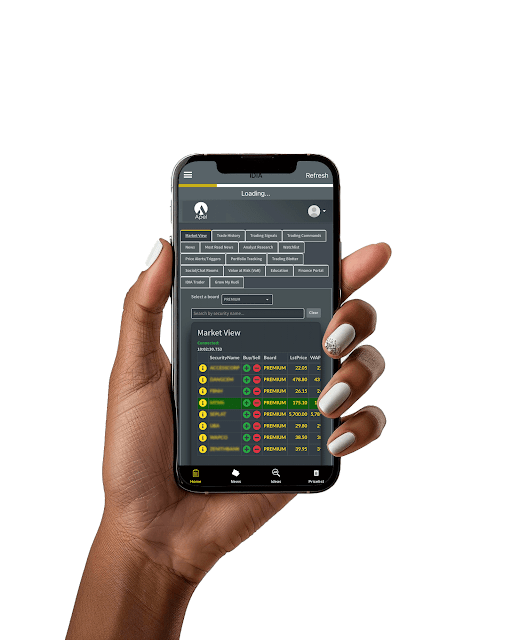
Elevate Your Trading Experience
with Apel Alpha
Unlock smarter trading on Apel Alpha
with reduced fees and seamless execution.
Trade at a reduced brokerage
commission of 0.50%


Online Placement/Execution of purchase and sale mandates

How to Trade Stocks
Follow the following steps to trade
-
Sign in to your account using your User ID and password.
-
From the home page, Navigate to theWeb Trading Terminal to access the Trading Portal
-
On the landing page, you see all trades in the market Select Stock and Click on BUY/SELL
-
Enter Price, Unit and Submit Select Stock and Click on BUY/SELL

100%
Trade
executions
Explore Our Frequently
Asked Questions
Find quick and clear answers to the most common
questions about Apel
1. Login to your Apel Asset Limited account on the online portal
2. On the Investments tab, click Account
3. Specify the Start Date of the account statement
4. Specify the End Date of the account statement
5. Click OK
1. Login to your Apel Asset Limited account on the online portal
2. On the Investments tab, click Portfolio Holdings
1. Login to your Apel Asset Limited account on the online portal
2. On the Trade tab, click Trade History
3. Select Open, Rejected or Cancelled orders to view their respective history
1. Login to your Apel Asset Limited account on the online portal
2. On the Trade tab, click Purchase Contract Notes
3. Specify the Start Date
4. Specify the End Date
5. Click OK
1. Login to your Apel Asset Limited account on the online portal
2. On the Trade tab, click Portfolio Transactions
1. Login to your Apel Asset Limited account on the online portal
2. On the Investments tab, click Certificates
3. Specify the Start Date
4. Specify the End Date
5. Click OK
Discover the freedom
of Total Financial Control
Download the Apel Smart Invest App and take the first step towards a more
balanced and hassle-free financial life.